Production is decided
before it begins
From automated MPS and MRP through E-MPS and CRP, and on to APS
To answer an order with “We can deliver by when?”, schedules, materials, people, and equipment must be viewed within a single plan. CMC TECH explains the structure of its proprietary production readiness solution and the sequence in which it expands.
“This order—by when can we deliver it?”
The reason it is difficult to answer this customer question immediately is not the ability of the person in charge, but where the information is located.
Sales asks production,
production asks materials,
and materials asks suppliers.
While the answer is making its way back, another order arrives and the conditions change again. As a result, delivery-date responses are delayed, and promises made in haste come back as adjustments on the day of production.
The problem becomes visible on the day of production,
but the cause lies in the preparation stage.
Even when MES records actual results accurately, the burden on the shop floor remains if preparation is insufficient. Here are eight recurring shop-floor symptoms and their causes.
| Symptoms visible on the shop floor | Causes in the preparation stage | Relevant functions | |
|---|---|---|---|
| Schedule | The schedule slips on the day, even though production started as planned | A schedule that does not reflect the line’s daily capacity and working days | MPS capacity-based allocation |
| The same semi-finished product is made over several days | Orders are issued separately for each finished product, so common demand cannot be consolidated | MPS hierarchical planning | |
| It is risky to change the conditions and recalculate | The calculation results are immediately reflected in actual production orders | Separation of planning and ordering | |
| It is impossible to tell which process is causing the bottleneck | There is only a product-level plan, with no process-level schedule | E-MPS process-level planning | |
| Materials | The shortage is discovered only after the line stops | The point at which a shortage will occur is not calculated in advance | MRP time-phased planning |
| Materials are purchased again even though they are already in stock | On-hand inventory and purchase orders already placed cannot be included in the calculation | MRP net requirements calculation | |
| Recalculation removes purchase orders that have already been organized | There is no distinction between confirmed purchase orders and purchase orders under review | Confirmed boundary · Fixed purchase orders | |
| The materials are ready, but there are no people or equipment | Only materials are prepared, without reviewing capacity | CRP · APS |
Five questions, One plan
CMC-EIMS expands production preparation across five stages. Start with the stages you need and expand to the next stage using the same master data.
What to make, when, and how muchConvert orders into an executable schedule and issue production orders only for confirmed plans
Which process, and whenBreak down the product-level plan into process-level schedules and process sequences
What to purchase, when, and how muchCalculate shortage dates and purchase orders by exploding the BOM and reflecting inventory and existing purchase orders
Do we have the capacity to do the workCompare the planned workload with the available time of equipment and personnel
Can we meet the delivery dateAssess delivery feasibility by reviewing capacity, materials, personnel, and equipment simultaneously
The status of a single order
Seven stagesare managed
You do not need to open multiple screens to check whether an order has been planned, an order has been issued, or a confirmation has been recorded. The workflow menu always displays the current stage.
- No need to enter the same values againThe order’s item number, quantity, and due date carry over to the plan creation screen.
- Production not included in orders, within the same planRegister inventory replenishment, trial production, rework, and urgent orders through the five-stage entry process.
This is not a menu for skipping stages. If the plan has not been confirmed, complete the prerequisite tasks first. During implementation, the approval procedures for plan changes and shop-floor changes are configured to match your operating standards.
Not a schedule on paper
An executable scheduleis calculated
Simply distributing production quantities across dates does not show whether the schedule is feasible on the shop floor. Resource capacity and the factory calendar provide the basis for the schedule.
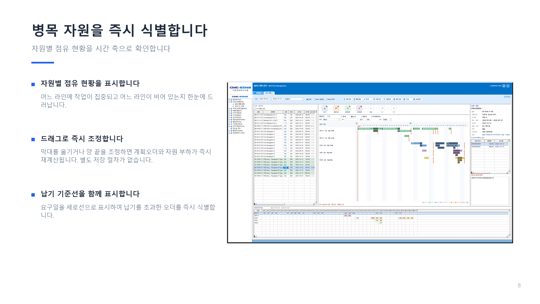
- Allocate within capacity limitsAllocate work while observing the daily capacity and working days of lines and equipment. No work is scheduled on non-working days.
- Highlight overloaded periods with colorDistinguish utilization of 85% or more from utilization exceeding 100% by resource and date.
- Show the basis for the calculationShow setup and processing times, whether there is a delay, and the demand fulfilled by this order.
- Recalculate immediately when movedWhen a bar is moved, the planned order and resource load are recalculated, and other orders that should be reviewed together are indicated.
Even when calculations reflect capacity, any indication of overload or delay requires checking the cause and input conditions. This does not mean that delivery dates are guaranteed under any circumstances.
Common subassemblies are in one batch,
recalculated safely
Electronic products often have multiple models sharing the same PCB ASSY. Both consolidating demand and repeating calculations must be possible without adding unnecessary burden.
Plan finished goods and subassemblies separately, then consolidate demand
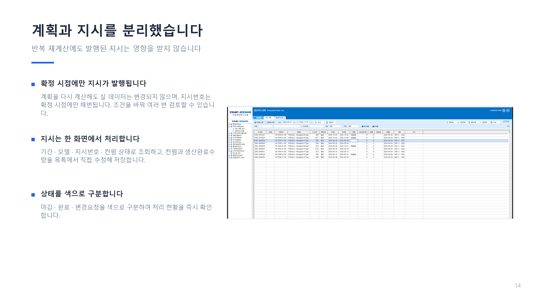
Plans and instructions are separated
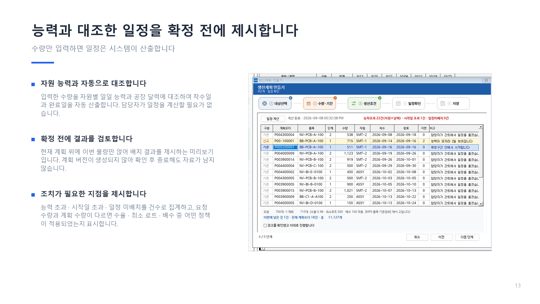
- Show the reason when requested and planned quantities differIndicate which policy was applied: yield, minimum lot size, or multiples.
- Count items requiring actionCapacity overload, start-date overrun, or unscheduled items.
E-MPS — Extends product planning
process planninginto
Extended MPS goes beyond finished-good quantities and completion dates to plan schedules for each process, along with the equipment and personnel required for those processes.
Four Things E-MPS Adds
- Schedules and dependencies by processCompletion of the preceding process becomes the condition for starting the next process.
- Equipment Availability ConditionsReflect the available operating hours of the equipment assigned to each process.
- WorkforceReview the personnel required for each process together with shift conditions.
- Interprocess Waiting and Work in ProcessCheck not only processing time but also the lead time that accumulates between processes.
The longer and more equipment-dependent the processes are, as in SMT, the harder it is to identify bottlenecks through product-level planning alone. The scope of connections among processes, equipment, and personnel is confirmed for each customer before finalization.
From Production Planning to Purchase Orders
Five Steps
Once MPS determines what to make and when, MRP calculates the materials required for production and when they are needed. The starting point is a confirmed production order.
Your tasks are divided into three cards
Prioritize urgent items by when shortages will occur
Do not place an order based on color alone. Confirm the supporting evidence—whether an existing receipt was delayed or new demand has arisen—before making a decision.
How muchrather than
when it will be shortis calculated
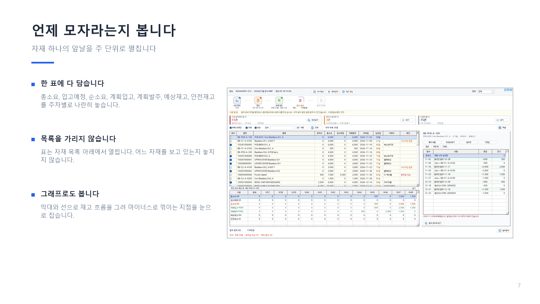
A large gross requirement does not mean purchasing the entire quantity. We reflect the quantity already secured and distinguish the week when a shortage will occur from the week when an order must be placed.
| Connector C-100 | Week 1 | Week 2 | Week 3 | Week 4 | Week 5 | Week 6 |
|---|---|---|---|---|---|---|
| Gross requirement | 300 | 400 | 0 | 600 | 300 | 400 |
| Scheduled receipt (already ordered) | 0 | 500 | 0 | 0 | 0 | 0 |
| Net requirement | 0 | 0 | 0 | 500 | 300 | 200 |
| Planned receipt | 0 | 0 | 0 | 500 | 500 | 500 |
| Planned order | 0 | 500 | 500 | 500 | 0 | 0 |
| Projected inventory | 200 | 300 | 300 | 200 | 400 | 500 |
On-hand inventory 500 · Safety stock 200 · Lead time 2 weeks · Order multiple 500Illustrative Example
Trace back why this quantity is needed
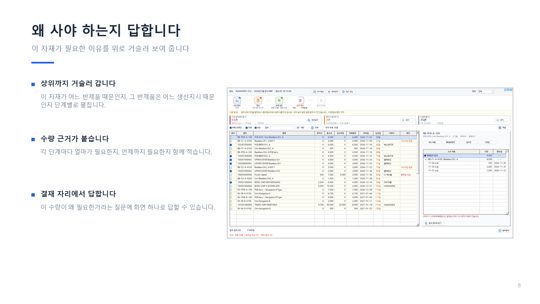
Tracing the basis of requirements (pegging) provides the rationale for quantities in purchase approvals and is the starting point for identifying materials affected when demand changes.
Even when recalculated
the plans already made do not disappear
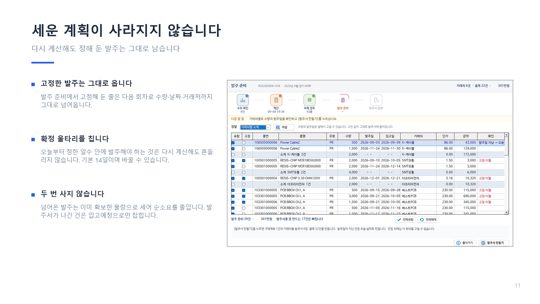
If even purchase orders agreed upon through consultation fluctuate with every recalculation, the person in charge has to repeat the same work. Fixed orders and the firm zone define that boundary.
If demand or the BOM itself has changed, you must check whether an inventory update alone is sufficient. Preserve the cycle that served as the basis for the order and review the new conditions as a new cycle.
CRP — Even when materials are ready
the capacity to executeis still required
Capacity requirements planning compares planned workloads with available capacity using the same time unit. Knowing in advance which weeks are over capacity gives you more options for responding.
Three components of capacity
- EquipmentAvailable operating hours, repair and calibration schedules
- PeopleWork rules, shifts, actual attendance, and available personnel
- ProcessesStandard time, setup time, and yield
Responses to overcapacity
People’s time is also a production resource. When connecting it to work standards in HR and time and attendance, define personal data access and approval responsibilities in line with company rules.
APS — four resources View them at once
Assess delivery feasibility
Select an order and run a simulation to evaluate capacity, materials, people, and equipment together. Before confirming it, first identify what needs to be addressed.
8 orders requiring production planning2 overlapping production start dates
12 types to purchase5 types with purchasing schedule issues
From the evaluation items, go directly to the production plan, material details, time and attendance data, and equipment schedule.Illustrative Example
APS operates on top of MPS and MRP
APS does not require new data. It makes assessments based on MPS schedules, MRP materials, CRP capacity, and time and attendance and equipment information when they are maintained on the same basis.
- That is why the order mattersMPS and MRP automation comes first; APS is an extension that brings the results together.
- Evaluations provide the basis for decisionsThe figures are calculated from the entered master data and plans; the final decision is made by the person in charge.
The evaluation items, calculation criteria, and scope of linked data are finalized after review with each customer.
Plans are validated on the shop floor,
and the shop floor improves the plans
The prepared plan is executed in MES, and the execution results flow back into planning. The gap between schedules on paper and actual shop-floor conditions is reduced only when equipment operation and workforce allocation are considered together.
Three things MES returns to planning
- InteractionInstructions, actuals, and work-in-progress status are exchanged between planning and the shop floor. This determines whether the next process can actually begin.
- Error-proofingVerify at the time of work that materials or sequences different from the plan are not used.
- TraceabilityRecord who made what, when, and under which LOT to track differences between the plan and execution.
The actual scope of data integration and level of automated control between planning and MES are confirmed during implementation.
When everyone sees the same plan
Their work changes
We do not promise implementation benefits in numbers. Instead, we explain what changes for each role. Actual results vary depending on the accuracy of master data and operating methods.
| Role | Now | After implementation |
|---|---|---|
| Sales | Wait for the production manager’s response before replying about the delivery date | Respond based on a schedule reviewed against capacity and materials |
| Production Planning | Split the schedule in Excel and adjust it on the day | Identify overload periods during planning and review again after changing the conditions |
| Purchasing · Materials | Discover shortages on the day and purchase again even when inventory is available | Know in advance which weeks will have shortages and order only the actual shortfall |
| Shop floor | Receive instructions but wait because materials, equipment, and personnel do not line up | Receive instructions after readiness is confirmed, with actuals reflected in the next plan |
| Management | It is difficult to understand why the plan changed | The plan for each run, reasons for changes, and basis for purchasing remain documented |
The calculation rules remain in the system even when the person in charge changes. However, BOMs, inventory, and expected receipts must be accurate, and production demand must be up to date to produce the same results.
Not everything at once
Expand step by stepdoes
Not every customer needs all five stages. We first review existing systems and master data, then configure the necessary stages first.
What to review together before implementation
- Does the BOM match the materials actually consumed?
- Can inventory quantities be trusted as the basis for calculation?
- Are standard times and setup times managed for each process?
- Who manages holidays and overtime, and where?
- Are lead times, minimum lots, and order multiples defined for each item?
- What data should be carried over from the existing ERP and MES?
The implementation period and cost are estimated after confirming the selected stages, data migration, integration with existing systems, and the scope of shop-floor application.
Actual Program Screens
These are the MPS and MRP screens of CMC-EIMS. This material has been scaled down for public viewing, and the screens and scope to be implemented will be finalized after reviewing the business requirements.
Production is decided before it begins.
We will prepare that decision together.
We begin by using one of your customer orders to verify together whether schedules, materials, and capacity remain connected under the same standards.